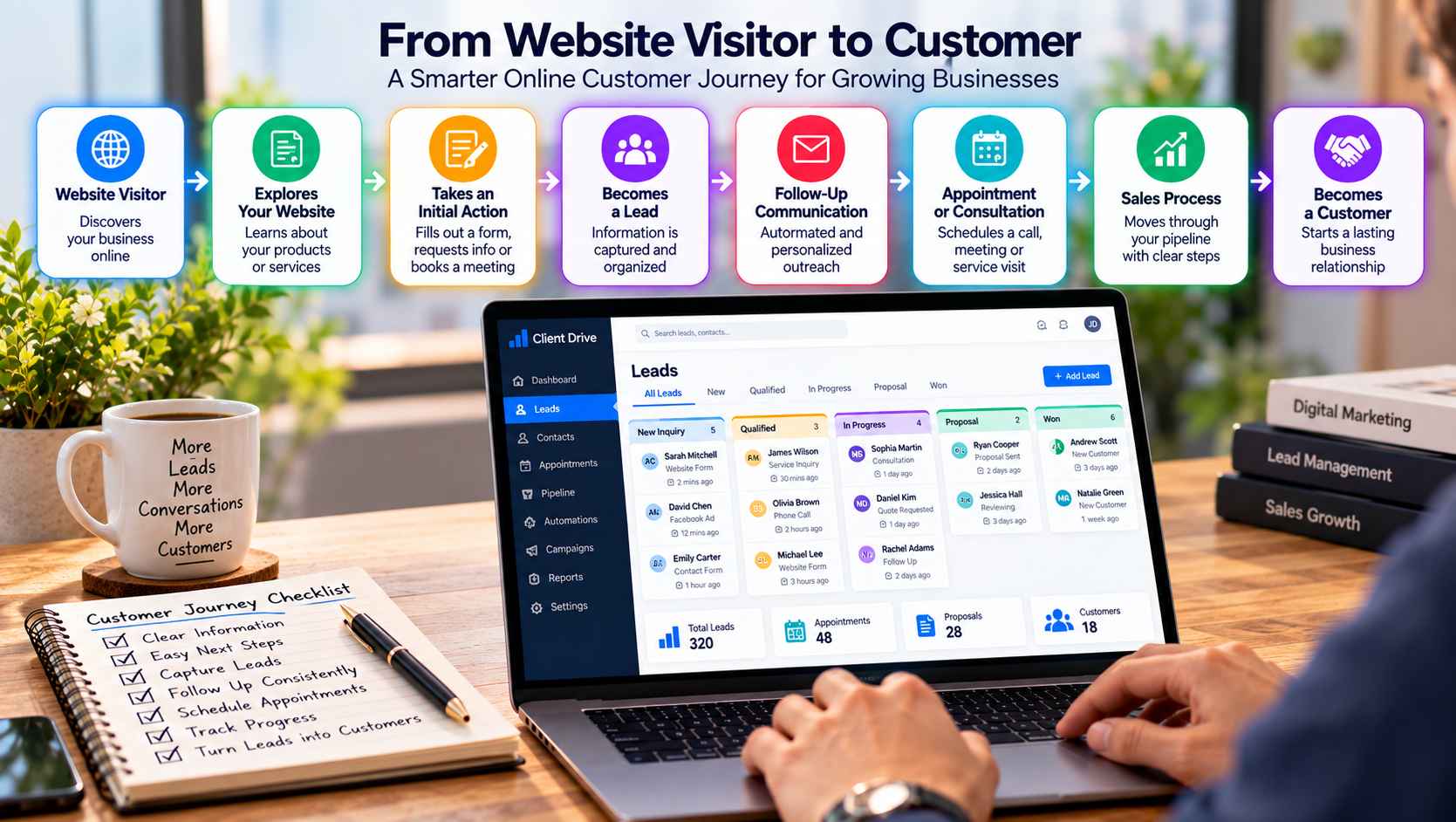
A website visitor is not automatically a sales opportunity. Someone may arrive after searching for a solution, browse a few pages, compare options, and leave without making contact. Another visitor may be ready to request information but encounter a confusing form or an unclear next step.
The difference often comes down to what happens after the first visit.
Businesses can improve the online customer journey by connecting the different stages between discovery and purchase. Instead of treating website visits, forms, appointments, follow-up messages, and sales conversations as separate activities, they can build a more organized path that helps prospects move forward at a natural pace.
Why Getting Website Traffic Is Only the Beginning
Bringing visitors to a website is only one part of customer acquisition.
Once someone arrives, they need to understand what the business offers, determine whether it is relevant to their needs, and find a reasonable next step. That might mean reading a service page, viewing a product, downloading information, submitting a form, or booking a consultation.
The journey can become more complicated after that first action.
A person who submits a form may need a follow-up email. Someone who books an appointment may need a confirmation and reminder. A qualified prospect may then enter a sales conversation before eventually becoming a customer.
Businesses that connect these steps have a clearer opportunity to understand what happens between the first website visit and the final decision.
For companies looking to bring lead generation and customer management into a more organized process, Client Drive is one example of a platform positioned around lead generation and CRM activities.
Give Visitors a Clear First Step
Visitors should not have to figure out the entire customer journey on their own.
A website should make important next steps easy to recognize. The appropriate action depends on the page and the visitor’s likely intent.
A service page might encourage someone to request information. A product page could direct visitors toward product details or a purchase. An educational article might offer a related resource or invite readers to subscribe to updates.
The wording should also be specific.
“Learn More” can be useful, but “View Consulting Services” tells the visitor more about what they will find. Likewise, “Contact Us” is straightforward, while “Request a Project Estimate” can be more relevant when the visitor is considering a specific service.
The objective is not to push every visitor toward a sales conversation immediately. It is to make the next useful action obvious.
Capture Information Without Creating Friction
When a visitor is ready to make contact, the process should be reasonably simple.
Contact forms and landing pages are common ways to capture information, but businesses should consider how much information they actually need at this stage.
A basic inquiry might only require a name, email address, and message. A company handling complex projects may need additional information to understand the request.
The right balance depends on the business.
A form that asks for too little information may create additional work later. One that asks for too much can make visitors hesitant to submit it.
The information collected should have a clear purpose. If a company asks for a phone number, project type, budget range, or preferred appointment time, the team should know how that information will be used.
The goal is to make the first interaction easy while collecting enough context to support the next stage.
Follow Up While the Interest Is Still Relevant
Submitting a form is not the end of the journey.
A prospect may still be comparing providers, waiting for an answer, gathering information from colleagues, or deciding when to move forward. Without a follow-up process, the initial interest can easily become disconnected from the sales process.
Follow-up does not always have to mean a personal phone call.
Depending on the business, it might involve an acknowledgment email, additional information, an appointment reminder, or a later message when the prospect is expected to be ready.
The important thing is consistency.
Businesses should know what happens after an inquiry arrives, who is responsible for the next action, and how the status of the prospect is recorded.
This becomes particularly important when several employees handle inquiries. A shared process reduces the chance that one person assumes someone else has already followed up.
Make Appointment Scheduling Easier
For businesses that depend on consultations, demonstrations, estimates, or meetings, scheduling is an important part of the customer journey.
A prospect may be interested enough to talk but still abandon the process if arranging a meeting requires several emails and phone calls.
An appointment system can create a smoother transition from interest to conversation.
For example, a consulting company could allow a qualified prospect to select an available consultation time. A service business might use scheduling after an initial inquiry to arrange an estimate or site visit.
However, not every visitor needs to be sent directly to a calendar.
The business may first need to understand the customer’s requirements or determine whether the inquiry fits its services. The scheduling process should therefore match the way the business actually sells.
Keep Sales Conversations Organized
Once a prospect becomes a qualified lead, the business needs a reliable way to manage the sales conversation.
Without an organized system, important information can become scattered between emails, spreadsheets, notes, and individual employees.
A pipeline provides a shared view of where opportunities currently stand.
A simple pipeline might include stages such as:
New Lead → Qualified → Contacted → Appointment → Proposal → Customer
The exact stages should reflect the company’s actual sales process.
The purpose is not to create a complicated structure. It is to make the current status of each opportunity visible.
A salesperson should be able to see which prospects require attention, which are waiting for a response, which have received proposals, and which have already moved forward.
Use Pipeline Data to Understand Progress
A connected customer journey also makes it easier to review what happens at each stage.
Businesses can examine questions such as:
Which pages generate inquiries?
Which marketing sources produce relevant prospects?
How many new inquiries receive follow-up?
Where do prospects tend to stop progressing?
How long does it typically take to move from an initial inquiry to a sales conversation?
The answers can reveal practical issues.
For example, a business may discover that its website generates plenty of inquiries but that many are not a good fit. Another company may find that qualified prospects are entering the pipeline but not receiving timely follow-up.
This type of information helps businesses focus on the part of the customer journey that actually needs attention instead of simply trying to attract more visitors.
Connect the Customer Journey With a CRM
The more stages a business has between first contact and purchase, the more useful a centralized customer record can become.
A CRM can bring contact information, interactions, lead status, appointments, follow-up activities, and sales pipeline information into a connected workflow.
This creates a clearer picture of the relationship.
For example, when a sales representative speaks with a prospect, they can understand how the person originally entered the system and what actions have already taken place. That context can make the next conversation more relevant.
A CRM can also reduce the need to repeatedly move information between different systems.
A platform such as an integrated CRM platform can be considered by businesses looking to connect lead generation, customer information, follow-up, and sales management within a more organized workflow.
The right setup will depend on the company’s size and sales process. A small business may need only basic contact and pipeline management, while a larger organization may require more advanced automation and reporting.
Use Automation Where It Actually Helps
Automation can be useful when it handles repetitive tasks that do not require human judgment.
Examples include sending an inquiry acknowledgment, confirming an appointment, creating follow-up reminders, or moving a contact to the appropriate stage after a defined action.
Automation should not make every interaction feel identical.
When a prospect asks a detailed question, discusses a complex project, or is close to making a purchase, personal communication may be more valuable than another automated message.
The strongest approach is usually a combination of both: automation for predictable administrative work and human involvement where context and judgment matter.
Build a Journey That Makes Sense to the Customer
The online customer journey should not be viewed as a collection of isolated marketing activities.
A visitor discovers the business. They learn what it offers. They explore relevant information. They take an initial action. The business captures their details, follows up, schedules conversations when appropriate, and manages the opportunity through the sales process.
Each step should connect logically to the next.
HubSpot’s overview of the marketing funnel similarly describes the customer path as progressing from initial awareness through qualification and toward a purchasing decision, while emphasizing that different stages require different messaging and actions. HubSpot’s marketing funnel guide
For businesses, the practical lesson is straightforward: improving the customer journey does not necessarily mean adding more steps. It often means removing unnecessary gaps between the steps that already exist.
A website should help visitors understand what to do next. Forms should capture useful information without unnecessary friction. Follow-up should happen consistently. Appointments should be easy to arrange when appropriate. Sales teams should have visibility into each opportunity.
When these pieces work together, the journey from website visitor to customer becomes easier to understand, manage, and improve.